1 Before you start
The shop can only use primary devices that exist. At least one of these must be in place:
- Configuration Manager — user device affinity is configured, so users are registered as the primary user of their computers.
- Intune — SoftwareCentral is connected to the tenant (see Intune Configuration), and devices have a primary user. The shopper must belong to an enabled tenant.
When a device is in both, because it is co-managed, it is listed once, as the Configuration Manager device.
2 The settings
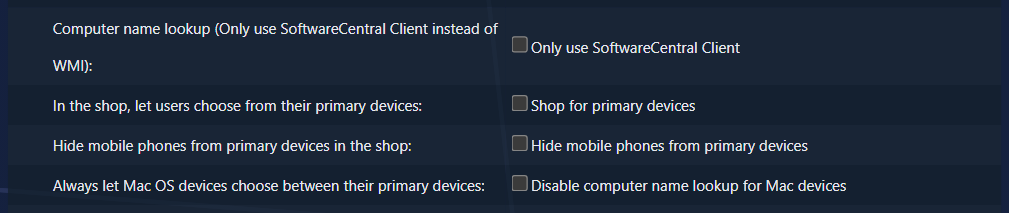
| Setting | What it does |
|---|---|
| Shop for primary devices | Turns it on for everyone. |
| Hide mobile phones from primary devices | Leaves Android and iOS devices out, so shoppers only choose between computers. |
| Disable computer name lookup for Mac devices | Macs always shop for their primary devices, also when the first setting is off. The shop recognises a Mac by its browser. Use it when the lookup, or the SoftwareCentral client, cannot run on your Macs. |
Click Save Settings on the right of the page. The settings apply to both the new and the classic shop.
3 What shoppers get
| Primary devices | What happens |
|---|---|
| One | The shop picks it and opens straight away. |
| More than one | The shopper chooses. In the new shop, from the device under their name (Your device). In the classic shop, on a page before the shop opens (Choosing a device). |
| None | See below. |
4 No primary device
A shopper without a primary device is not stopped: the shop falls back to the normal computer name lookup, with DNS or the SoftwareCentral client as set in Computer name lookup. See The SoftwareCentral client. If that fails too, the shop cannot tell the device and says so. Register the user as the device's primary user to fix it.
5 Best practice
- Hide mobile phones only together with Shop for primary devices. The setting's tooltip says it can only be used with that setting, and that it hides phones, so users with a computer and a phone install software on the computer.
- Know what the Mac setting does before you turn it on. Its tooltip says Mac devices are redirected to the device chooser page, and users with one primary device go straight to the shop.
6 Troubleshooting
| Symptom | Cause | What to do |
|---|---|---|
| “We were unable to resolve your computername - For further details, see the log.” | The shop could not find the shopper's computer, and no primary device could be used instead. | Register the user as the primary user of the device, then open the shop again. Open the Log for details. |
| “Unable to determine Intune tenant and resource id for device… The device must exist in either SCCM or Intune to be able to access the shop.” | The device is not known to SCCM or Intune, so the shop cannot open for it. | Check that the device exists in Configuration Manager or Intune, and that the shopper belongs to an enabled Intune tenant. |