1 Your orders
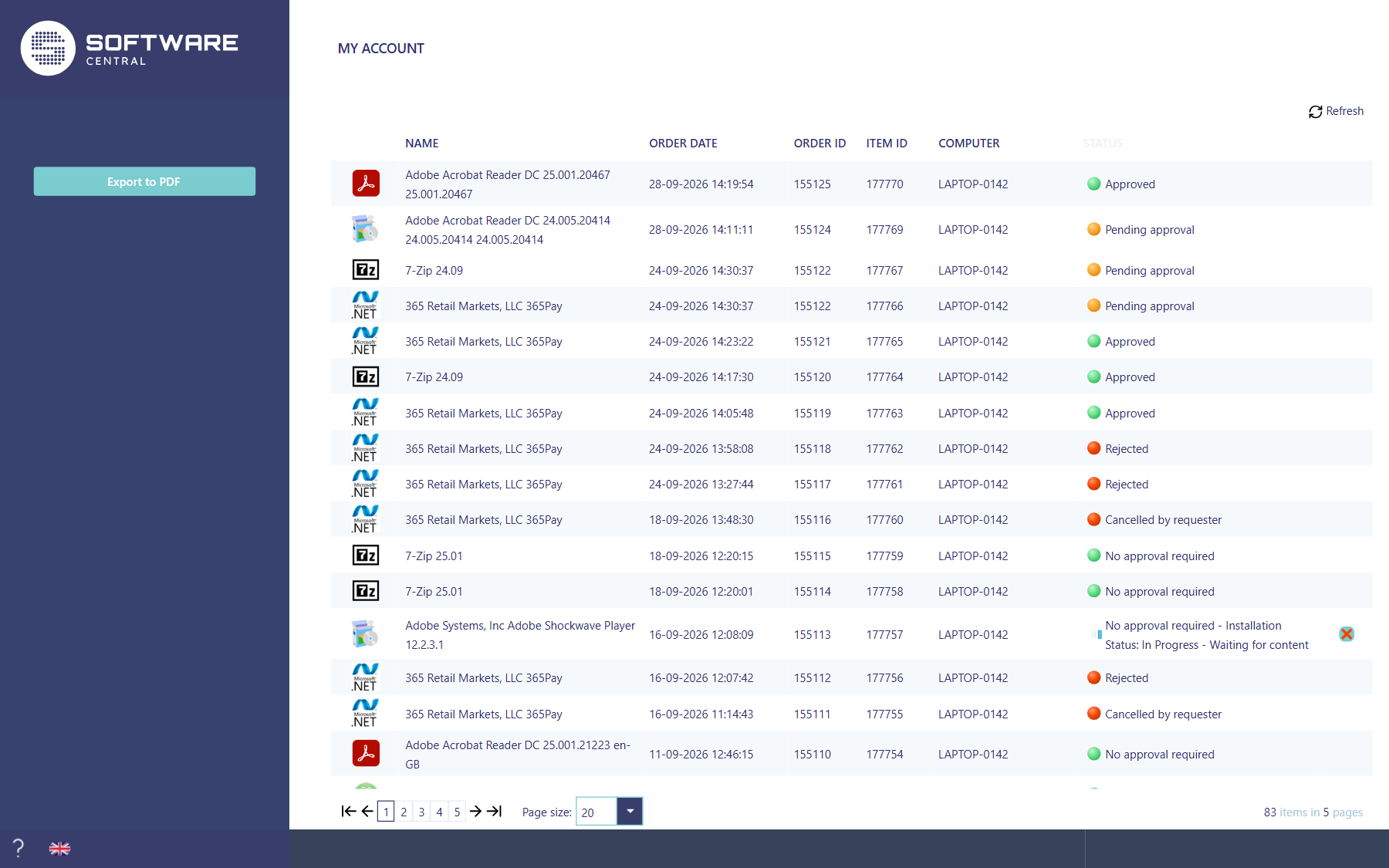
Open it with My Account at the top right of the shop. Every item you have ordered is one row, newest first. Items ordered together share an Order ID; each has its own Item ID. Computer is the device the item was ordered for. Quote the order ID when you contact your IT department about an order.
2 What the status means
| Status | What it means |
|---|---|
| No approval required | The item did not need an approval and was sent to your device. |
| Pending approval | An approver has not decided yet. |
| Approved | The approver said yes, and the item was sent to your device. |
| Rejected | The approver said no. |
| Cancelled by requester | You cancelled the order. |
The dot in front of the status is green when all is well, yellow while something is in progress and red when the order was stopped. For a program that is still being installed, the status also shows how the installation is going, for example Installation Status: In Progress.
3 Removing a program
A program that was approved, or needed no approval, and is installed on the device has a red cross at the end of its row. Click it and confirm to remove the program. The status changes to Removing while it is uninstalled.
4 Refresh and export
- Refresh above the list reads the latest status.
- Export to PDF on the left saves the list as a PDF file.
5 Best practice
- Quote the Order ID when you contact IT. Items ordered together share one Order ID, so it is the quickest way to find them.
- Read the confirmation before you remove a program. The dialog asks “Are you sure you want to remove this program?”; the removal only starts after you confirm, and the status then changes to Removing.
6 Troubleshooting
| Symptom | Cause | What to do |
|---|---|---|
| “No items found” is shown in the list. | No orders are recorded for the account you are signed in with. | Check that you are signed in with the account you ordered with. If you have not ordered anything yet, the list stays empty. |
| “Data is unavailable. Try again later.” is shown in the status column. | The approval flow of the order could not be loaded. The error is written to the log as the critical entry “Failed to load approval status.” | Try again later. If it keeps happening, open the Log and read the entry for the error. |