The SoftwareCentral account SCCM_SWC_ADMIN needs privileges on the SCCM server.
|
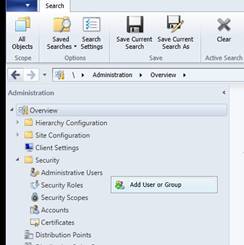
Right-click “Administrative Users” from the Security folder in the Administration Navigation pane and select “Add User or Group” from the context menu.
This brings forth the “Add as a Configuration Manager administrative user Wizard”.
|
|
|
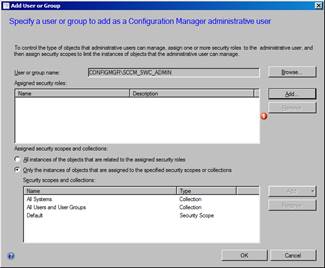
Click on the “Browse” button and add the SCCM_SWC_ADMIN user created in section 1
|
|
|
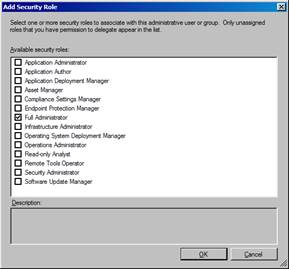
Click on the “Add” button, select the Full Administrator and click OK.
If you do not wish to grant the service account full administrative permissions, you can create a custom Security Role with the following permissions:
- Application
- Read; Modify; Delete; Create; Approve; Move Object; Modify Folder; Run Report; Modify Report
- Application Group
- Read; Modify; Delete; Set Security Scope; Create; Approve; Move Object; Modify Folder
- Boot Image Package
- Read; Modify; Delete; Create; Move Object; Modify Folder
- Collection
- Read; Modify; Delete; Remote Control; Modify Resource; Delete Resource; Create; View Collected File; Read Resource; Move Object; Deploy Packages; Deploy Client Settings; Modify Folder; Deploy Applications; Modify Collection Setting; Deploy Task Sequences; Run Script; Notify resource; Modify Client Status Alert
- Computer Association
- Read; Delete; Create; Move Object; Modify Folder; Recover User State; Run Report; Modify Report
- Configuration Item
- Read; Modify; Delete; Create
- Distribution Point
- Read; Copy to Distribution Point
- Distribution Point Group
- Read; Copy to Distribution Point
- Folder Class
- Read; Modify; Delete; Create
- Package
- Read; Modify; Delete; Create; Move Object; Modify Folder; Run Report; Modify Report
- Phased Deployments
- Read; Modify; Delete; Create
- Query
- Read; Modify; Delete; Create; Move Object; Modify Folder
- Site
- SMS Scripts
- Read; Modify; Delete; Create; Move Object; Modify Folder; Approve
- Software Metering Rule
- Read; Modify; Delete; Create; Move Object; Modify Folder; Modify Report
- Software Update Group
- Read; Modify; Delete; Create; Move Object; Modify Folder
- Software Update Package
- Read; Modify; Delete; Create; Move Object; Modify Folder
- Task Sequence Package
- Read; Modify; Delete; Create; Move Object; Modify Folder; Modify Report
- User Device Affinities
- Read; Modify; Delete; Create; Modify Report
|
|
|
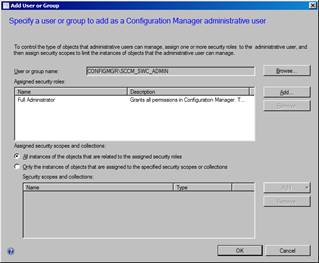
Select “All instances of the objects that are related to the assigned security roles and click OK
|
|
See Also
