1 Switching it on
All three settings are under Settings › SoftwareCentral › New Shop. The feature only works when all three are set.
| Setting | What to choose |
|---|---|
| Request install of hidden apps | Tick it. |
| Install requests approved first by | The team that decides requests, for example the service desk. |
| Who may request an install | The shoppers who may ask. No group means nobody — there is no "everyone" by accident. |
2 What shoppers see
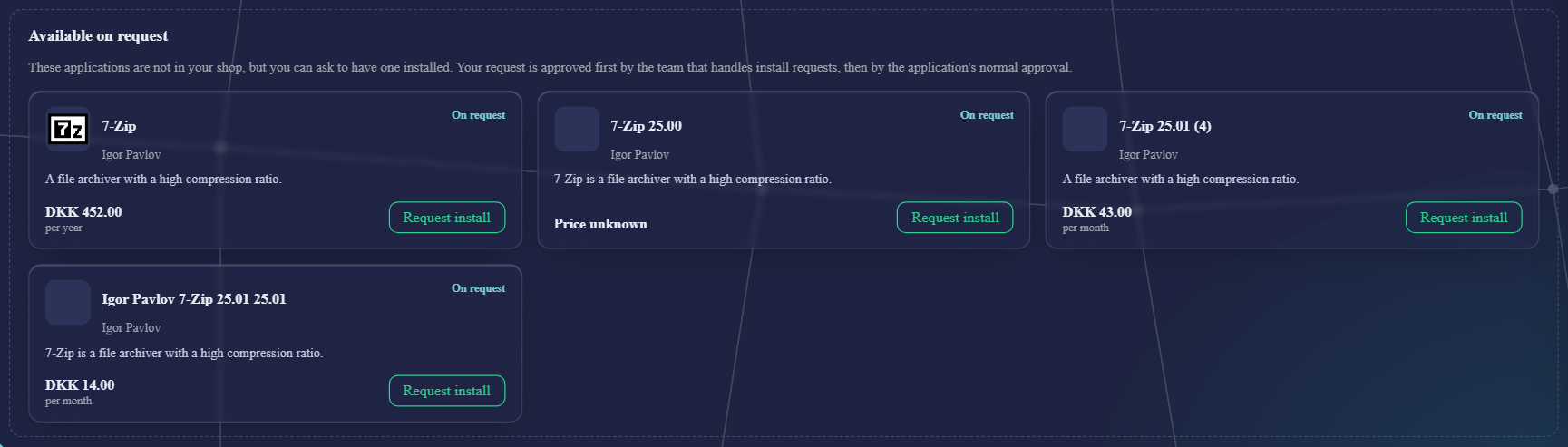
- Only after a search of at least three letters, and at most five applications per search, matched on the name.
- Only applications the shopper cannot see because of who may order them — not ones that are closed, retired or not meant for their device.
- A reason is required. The request is sent straight away, without the basket.
- Not while someone orders on behalf of another person.
The user guide page Requesting a program shows it from the shopper's side.
3 How a request is approved
Request→
Install-request team→
The application's own flow→
Installed for the requester
- A request is an ordinary order for the requester and their device, and always needs approval.
- Any one member of the install-request team decides the first step. Then the application's own approval flow starts, as for any order.
- If the team is also one of the application's approvers, it is asked only once.
- Approvers see an Install request chip. They can approve or decline, but not send it back — the requester could not order it again from the shop.
- A request is never installed before it is approved, even if the application has Install Before Approval.
- The normal mails are sent.
4 Good to know
An approved request installs the application for that one person. It does not change who may order it, so it stays hidden in their shop and everyone else's. If many people ask for the same application, consider offering it to a wider group instead.
5 Best practice
- Fill in both groups. Without an approver team nobody can request an install of a hidden application, and without a requester group nobody can ask for one.
- Approve or decline a request; do not try to send it back. The shop refuses to send an install request back, because the requester could not order it again from the shop.
- Expect the application's own approval after yours. Approving an install request installs the application for that requester only.
6 Troubleshooting
| Symptom | Cause | What to do |
|---|---|---|
| Shoppers do not see Request install on hidden applications. | One of the two groups is empty. The settings say Without an approver group, nobody can request an install of a hidden app or Without this group, nobody can request an install of a hidden app. | Under Settings › SoftwareCentral › New Shop, choose a group for Install requests approved first by and one for Who may request an install, then save. |
| “An install request cannot be sent back: the requester cannot see the application in the shop to order it again” | The requester cannot see the application in the shop, so it could not be ordered again if it were sent back. | Approve or decline the request. |
| “This request is no longer waiting for you. Reload to see the current list” | The request is no longer at the step where you are waiting, for example because it has already been decided. | Reload the approvals page. |
| “Your approver account could not be identified, so the decision was not recorded” | The shop could not match your account to an approver. | Ask IT to check that your account is set up as an approver, then try again. |
| “The decision could not be recorded. The log has the details” | An error stopped the decision from being saved. | Open the Log and read the entry for the error, then try again. |
| “The reason can be at most n characters” | The reason the shopper typed is longer than the limit shown in the message. | Shorten the reason and send the request again. |