1 Before you start
The script is the file created in the Design HTA chapter, and it is called HTA_Dynamic.hta. All changes to the script can be made in any text editor.
The address is mandatory. The other steps are optional settings, so that the HTA fits the needs it was created for.
2 The address
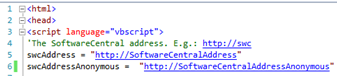
The script has one address line, swcAddress. SoftwareCentral fills it in with the address of your SoftwareCentral site when it writes the script. A slash at the end of the address is removed by the script.
If the HTA uses Anonymous authentication, SoftwareCentral writes the placeholder http://SoftwareCentralAddressAnonymous instead. Change the placeholder to the address of the anonymous website that you created in Setup Website.
3 MAC address or SMBIOS GUID
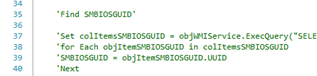
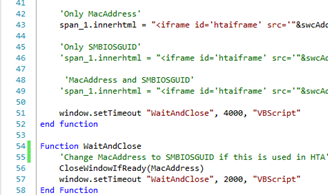
The script identifies the computer by its MAC address, its SMBIOS GUID, or both. The design decides which. When SoftwareCentral writes the script, it sets the two switches below to match the elements in the design.
| Switch in the script | Set to true when the design has |
|---|---|
| UseMacAddress | The MAC Address element. |
| UseSMBIOSGUID | The MSBIOS GUID element. |
To identify computers by MAC address only, use UseMacAddress = true and UseSMBIOSGUID = false. For SMBIOS GUID only, use the opposite. For both, set both to true. If you change a switch by hand, it must match the design.
The SMBIOS GUID lookup is always in the script. It only runs when UseSMBIOSGUID is true, so you do not need to uncomment any lines.
4 Computer name
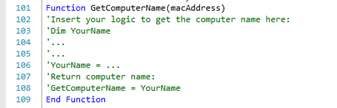
If your naming convention is not supported by the automatic computer naming of SoftwareCentral, the script can get the computer name from your own code. Add the code in the GetComputerName function.
The function only has an effect on unknown computers. The function in the current script looks like this:
Function GetComputerName(macAddress)
'Insert your logic to get the computer name here:
'Dim YourName
'...
'...
'YourName = ...
'Return computer name:
'GetComputerName = YourName
End Function
5 Best practice
- Use the anonymous website's address for the placeholder when the HTA uses Anonymous authentication. SoftwareCentral only writes the placeholder; it does not know your anonymous address, so you must change it.
- Make your edits after the last save or download. Each save or download writes a new copy of the script from the template.
- Keep the switches in the script the same as the design. The design needs the MAC address or the SMBIOS GUID element.
- Use the computer name function only for your own naming rule. It only has an effect on unknown computers.
- Copy the changed script to the boot image share, and distribute the boot image again. See Setup Windows PE.
6 Troubleshooting
| Symptom | Cause | What to do |
|---|---|---|
| "Failed to create dynamic HTA script." (in the SoftwareCentral log, not on the screen) | SoftwareCentral could not copy the template to Uploads\HTA\HTA_Dynamic.hta when you saved or downloaded the HTA, so the file does not match the design. | Read the log entry for the details. Make sure the SoftwareCentral web site can write to its Uploads\HTA folder, then save or download the HTA again. |
The HTA does not reach SoftwareCentral, and the script still contains http://SoftwareCentralAddressAnonymous | The placeholder for Anonymous authentication was not changed. | Change it to the address of the anonymous website from Setup Website. |
| Your changes to HTA_Dynamic.hta have disappeared | Saving or downloading the HTA in Design HTA wrote a new copy of the script from the template. | Make the changes again after the last download. |