1 What the anonymous site is for
Set up an extra SoftwareCentral web site for the HTA. This web site must be anonymous.
The main SoftwareCentral web site requires a signed-in user (see Set the Authentication for the SoftwareCentral website). The HTA runs before anyone is signed in, so it uses this second web site, which allows Anonymous Authentication. The HTA closes itself automatically when it is ready.
The same web site can also be used if the entire HTA is set up to run anonymously.
2 Add the site in IIS Manager
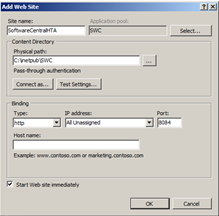
- On the web server that hosts the SoftwareCentral website, open Internet Information Services (IIS) Manager. Right-click and add a new web site with Add Web Site…, as shown in the picture below.
- Configure the new web site so that it uses the data of the main web site:
- a. Application pool: select the application pool of the main site.
- b. Physical path: select the install directory of SoftwareCentral.
- c. Port: select a port that is not used by any other web site.
- d. Optional: a Host name can be added to make the script easier to set up later. Remember to create a host record in DNS for it.
- e. Click OK to create the web site.
3 Allow anonymous access only
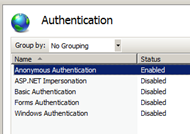
- Go to the Authentication settings of the newly created web site. Enable Anonymous Authentication. All other types of authentication must be disabled, as shown below.
4 Other use of the site
The same anonymous web site is also the address that the self-service Reset Password page is opened from. The page is loaded from this site because the normal sign-in cannot be used there. Its address is entered in the Reset Password - Anonymous site address setting, and the reset e-mails link to it.
5 Best practice
- Allow Anonymous Authentication and nothing else on this site. With Windows Authentication enabled on the anonymous site, the browser asks for a Windows sign-in on the HTA pages.
- Use the application pool and install folder of the main site. SoftwareCentral keeps its settings in its database, not in the web site, so both web sites read the same configuration.
- Use HTTPS for the anonymous site. The Settings page says that the anonymous site should use HTTPS when self-service password reset is used.
- Create the DNS host record first. If you enter a host name, create its DNS record before you use the name, and use the same name wherever you enter the anonymous site address.
6 Troubleshooting
| Symptom | Cause | What to do |
|---|---|---|
| The browser asks for a Windows user name and password on the HTA pages. | Anonymous Authentication is not enabled on the anonymous site, or Windows Authentication is enabled on it. | Open the Authentication settings of the anonymous site and follow step 3: enable Anonymous Authentication and disable the others. |
| The anonymous site address does not open. | The host name has no DNS record, or the port is used by another web site. | Create the host record (step 2d), or check that the port you chose in step 2c is not used by another site. |