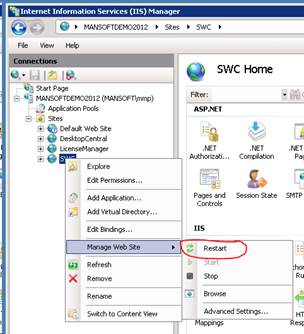
1 Restart the site
From the Internet Information Services (IIS) Manager, restart the site.
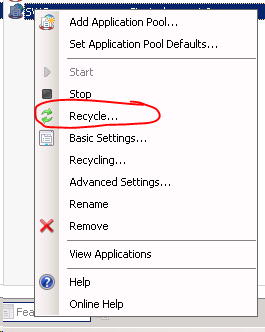
2 Recycle the application pool
From the Internet Information Services (IIS) Manager, recycle the application pool:
Local administrator
Local admin on the server requires a restart of the web server itself.
3 Restart from SoftwareCentral
You can restart the website from inside SoftwareCentral with the Restart SoftwareCentral button, in the Maintenance section of General Settings, row Restart website.
SoftwareCentral first tries to unload its own application, which restarts it. If that is not allowed on the server, it
changes the time stamp of web.config instead. IIS then loads the site again.
All users are disconnected
The button disconnects all users, and any operation that is running is terminated. It may cause corrupted data if a process is
running. Use it when nobody is working.
4 Best practice
- Restart when nobody is working. All users are disconnected and running operations are stopped. See General Settings.
- Restart the website after you change the application pool password. The password is changed in three places, and the website is restarted last. See Configure the application pool.
- Keep
web.configwritable for the application pool account. When SoftwareCentral cannot unload itself, the restart from inside SoftwareCentral changes the time stamp ofweb.config. If that fails, restart the site in IIS Manager instead.
5 Troubleshooting
| Symptom | Cause | What to do |
|---|---|---|
| The Log shows the critical message "Failed to restart website." | SoftwareCentral could not unload its application, and it could not change the time stamp of web.config either. |
Restart the site or recycle the application pool in IIS Manager, as described above. Check that the application pool account is allowed to change web.config. |