1 Opening Health Check
Health Check is in the Settings menu. The menu item is only enabled when Send diagnostic data is ticked (see the note below).

Enable the setting first
Health Check needs Send diagnostic data. Go to Settings › General Settings › SoftwareCentral Update, tick
Send diagnostic data under Allow SoftwareCentral to report diagnostic data to SoftwareCentral Update, and click
Save Settings. The tooltip on the setting says that the information is encrypted and sent anonymously.
2 What is checked
Each run tests four kinds of connection. The page is read only: you can page, sort and resize the columns, but there are no actions.
| Type | What it tests | Server and Details |
|---|---|---|
| SWC SQL | The SoftwareCentral database. It is not checked when the server runs as a cloud connector. | Server: the database server. Details: Database: <name> |
| SCCM SQL | The Configuration Manager site database, one row for each site. | Server: the database server. Details: Database: <name> |
| WQL | The Configuration Manager site server, one row for each site. The check asks the site server for the unique ID of the site. | Server: the site server. Details: WQL Method |
| LDAP | Active Directory. The check searches the domain of the application pool account for that account. | Server: empty. Details: Domain: <domain> |
3 Reading the results
The grid has one row for each check that ran. These are the columns, in the order shown.
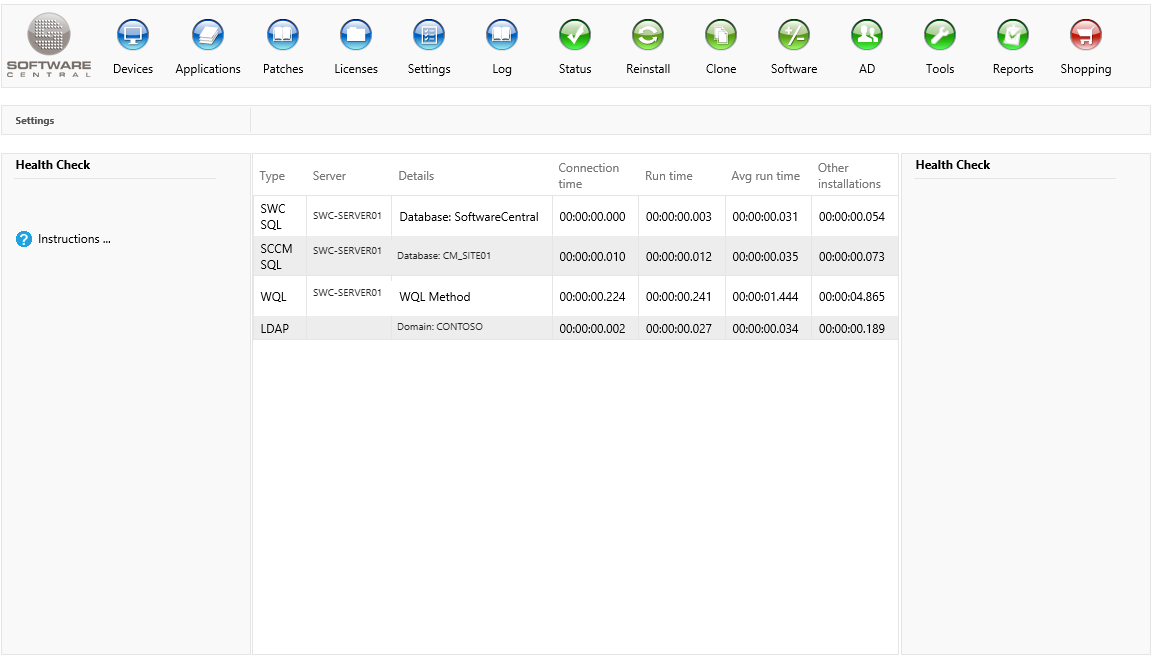
| Column | What it tells you |
|---|---|
| Type | The type of check: SWC SQL, SCCM SQL, WQL or LDAP. |
| Server | The server the connection is made to. Empty for LDAP. |
| Details | The database name, the WQL method or the domain. When a check fails, this column shows the error message instead. |
| Connection time | The time it took to open the connection. It is 00:00:00.000 when the check failed before it connected. |
| Run time | The time for the connection and the test command together. |
| Avg run time | The average run time of all the stored checks of the same type on this installation. The current run is included. |
| Other installations | The average connection time from other SoftwareCentral installations. This column is hidden in the current version and no figures are shown for it. |
4 Things to know
- Results are kept for your session. The first time you open the page, the checks run. Until your web session ends, opening the page again shows the same results and does not run the checks again.
- Each run is stored. Every check that runs is saved on this installation, and the Avg run time column is worked out from those saved runs. Many runs over time give a more useful average than one run.
- A failed check still gets a row. The row shows the error message in Details, with the times that were reached.
- The LDAP check is only a directory search. It fails when the directory cannot be searched. If the search runs without an error, the row passes even if the account is not found.
5 Best practice
- Run it from the SoftwareCentral web server's point of view. The checks are made by the web server, so a green row means the web server can reach that database, site server or domain, not that your own computer can.
- Turn on Send diagnostic data only after you have read its tooltip. It is the setting that enables this page, and it also controls whether diagnostic data is reported to SoftwareCentral Update.
- Compare the run times with the average, not with a single number. A slow run is only a concern when it is well above the Avg run time for the same type.
- Check after changes. Run Health Check after you move a site server or a database, change the domain account, or change a password, before the shop or the Configuration Manager reports fail.
6 Troubleshooting
| Symptom | Cause | What to do |
|---|---|---|
| The Health Check menu item is disabled, with the tooltip "To use this function, SoftwareCentral must be enabled to send diagnostic data to SoftwareCentral Update. (Enable it from the Settings menu)" | Send diagnostic data is not ticked. | Tick it under Settings › General Settings › SoftwareCentral Update, click Save Settings, then open Health Check again. |
| Details: "Failed to run query 'SELECT * FROM MenuButton2012' for a health check." | The SoftwareCentral database could not be reached, or the test query failed. | Check that the web server can reach the SoftwareCentral database. Details are written to the Log with the database category. |
| Details: "Failed to run query 'SELECT * FROM Sites' for a health check." | The Configuration Manager site database could not be reached with the connection for that site. | Check the database connection for that site and that the account can read the database. Details are written to the Log. |
| Details: "Failed to get the unique ID of the installed Configuration Manager site with sitecode '<code>' for a health check." | The site server could not be reached, or it did not answer the site ID request. | Check that the site server is running and reachable from the web server. Details are written to the Log. |
| Details: "Failed to perform AD health check." | The domain of the application pool account could not be searched. | Check that a domain controller for that domain is reachable from the web server. Details are written to the Log. |
| The numbers do not change after you have fixed a problem | The results are kept for your session, so the page shows the results from the first run. | Wait until your web session has ended, then open Health Check again to run the checks again. |