1 What is needed
This page describes the prerequisites for installing and running SoftwareCentral. The hardware requirements are the same as for the operating system the servers run.
- One service account (Active Directory account).
- One Active Directory group.
- A fully configured web server, with:
- the required roles and features,
- Microsoft SQL Server Management Studio,
- Internet Information Services (IIS) Manager.
- Access to the databases: an account with permission to create a database and create a login.
2 Supported ConfigMgr versions
SoftwareCentral supports these versions of Microsoft System Center Configuration Manager (ConfigMgr, also called MECM).
| Requirement | Why | How to check |
|---|---|---|
| SCCM 2012 R2 and above | SoftwareCentral reads the ConfigMgr site and its database. | Open the site properties in the Configuration Manager console. |
| SCCM Current Branch 1511 and above | The same, for the current branch of ConfigMgr. | Open the site properties in the Configuration Manager console. |
3 System requirements
The web server and the SQL server need the resources in these tables.
Web server
| Requirement | Why | How to check |
|---|---|---|
| Windows Server 2016 or above | The operating system of the web server. | Open Server Manager on the server; the operating system is shown on the Local Server page. |
| IIS 7.5 or above | Hosts the SoftwareCentral web site. | Open IIS Manager and choose Help › About Internet Information Services. |
| Microsoft .NET Framework 4.8 or above | SoftwareCentral is built for .NET Framework 4.8. | Run in PowerShell: (Get-ItemProperty 'HKLM:\SOFTWARE\Microsoft\NET Framework Setup\NDP\v4\Full').Release. A value of 528040 or higher means 4.8 or later. |
| Dual core processor or above | The web server handles the users and the ConfigMgr requests. | Open System in Control Panel and read the processor. |
| 8 GB of memory or above | Memory for the web site and its services. | Open System in Control Panel and read the installed memory. |
| 5 GB of free disk space or above | Room for the installed files and logs. | Open the drive in File Explorer and read the free space. |
SQL server
| Requirement | Why | How to check |
|---|---|---|
| Microsoft SQL Server 2012 or above, or Microsoft SQL Express Server 2012 or above | SoftwareCentral keeps its settings and data in this database. | Connect with SQL Server Management Studio, right-click the server, and open Properties. The version is on the General page. |
| 5 GB of free disk space or above | Room for the database files. | Open the drive of the database files in File Explorer and read the free space. |
Hardware requirements increase with the number of users who use SoftwareCentral at the same time. If needed, SoftwareCentral supports load balancing and SQL clusters.
4 Service accounts and permissions
The SoftwareCentral service runs under the application pool account of the web site. Give that one Active Directory account the rights below.
| Requirement | Why | How to check |
|---|---|---|
| Read, write and execute permissions on the SoftwareCentral database | SoftwareCentral stores its settings and data in this database. | In SQL Server Management Studio, open the login's User Mapping page and check the SoftwareCentral database. |
| Read and execute permissions on all SCCM site databases | SoftwareCentral reads the ConfigMgr data from these databases. | Check the login's User Mapping on each site database. |
| Full administrator rights on all SCCM sites (can be delegated to multiple service accounts) | SoftwareCentral works in the ConfigMgr sites with these rights. | In the Configuration Manager console, check the account under Administration › Security › Administrative Users. |
| Local administrative rights on the web server | The web site and the service run on this server. | Check the account is a member of the local Administrators group. |
| Log on as a service rights on the web server | The SoftwareCentral service starts under this account. | Open Local Security Policy › User Rights Assignment › Log on as a service. |
| Act as part of the operating system permissions on the web server (optional) | Listed as optional in the requirements. | Open Local Security Policy › User Rights Assignment › Act as part of the operating system. |
| Replace a process level token permissions on the web server (optional) | Listed as optional in the requirements. | Open Local Security Policy › User Rights Assignment › Replace a process level token. |
| Adjust memory quotas for a process permissions on the web server (optional) | Listed as optional in the requirements. | Open Local Security Policy › User Rights Assignment › Adjust memory quotas for a process. |
| Administrative rights on all clients managed through SoftwareCentral (can be delegated to multiple service accounts) | SoftwareCentral reads and changes the clients through this account. | Check the account is a member of the local Administrators group on a client. |
| Read and write permissions on a package share | SoftwareCentral works with the package files on the share. | Open the share with the account and check that files can be read and written. |
The group below manages administrator access to SoftwareCentral.
| Requirement | Why | How to check |
|---|---|---|
| One Active Directory group to manage administrator access to SoftwareCentral | Members of this group are the administrators of SoftwareCentral. | Check that the group exists in Active Directory. |
| The account used to install SoftwareCentral must be a member of this group | The installing account needs administrator access to finish the setup. | Check the group membership of the installing account in Active Directory. |
5 Server roles and features
These roles and features must be installed on the web server.
| Role or feature | Why | How to check |
|---|---|---|
| Web Server › Application Development › ASP.NET and ASP | The SoftwareCentral web site is an ASP.NET site. | Open Server Manager › Manage › Add Roles and Features and check the installed roles. |
| Web Server › Security › Windows Authentication | SoftwareCentral identifies the signed-in user with Windows Authentication. | Check the same page, under Security. |
| Web Server › Performance › Static Content | The site serves its images and style sheets as static files. | Check the same page, under Performance. |
All default settings from http://technet.microsoft.com/en-us/library/cc753473.aspx must also be enabled.
6 Ports
These ports must be open between the servers and the clients that SoftwareCentral uses.
| Port | Used for |
|---|---|
| 80 | HTTP connection to the site. |
| 443 | HTTPS connection to the site, if SSL is used. |
| 1433 | Database connections. |
| 135 and the port range defined in the environment | WMI calls. |
| 2701 and 2702 | The Remote Control Tool on SCCM 2012. |
| 389 for LDAP, or 636 for LDAPS | Active Directory lookups. |
| 445 | Reading log files on clients. |
| 137 UDP and TCP | Network discovery. |
| 138 UDP | Network discovery. |
| 139 TCP | Network discovery. |
7 Browsers and screen resolution
These are the minimum browser versions that SoftwareCentral supports.
| Browser | Minimum version |
|---|---|
| Microsoft Edge Chromium | 88 |
| Google Chrome | 70.0 |
| Mozilla Firefox | 19.0 |
| Microsoft Internet Explorer | 11.0 |
| Microsoft Edge | 44.0 |
We recommend that all add-blocker plug-ins are disabled for SoftwareCentral.
A screen resolution of at least 1366x768 is recommended to get the best experience of the user interface. SoftwareCentral is optimised for resolutions of 1920x1080 or above.
8 Requirements for the ConfigMgr setup
SoftwareCentral primarily deploys software and operating systems by adding direct membership rules on predefined install and uninstall collections. Root folders are defined, so that only the correct collections are used.
If needed, SoftwareCentral can automatically generate a complete collection structure for all packages and applications.
Scripts are available to add existing computers to the right collections, so that software can be managed by SoftwareCentral.
The best result is achieved if packages, applications and task sequences are located on the central administration site or, in single-site environments, the primary site.
9 Patch Management and modules
| Module | Requirement |
|---|---|
| Patch Management | A WSUS server with access to the internet is required to use the patch management module. |
| SoftwareCentral Plus ! (package subscription) | SoftwareCentral must be allowed to communicate with our servers over either HTTP or HTTPS. A separate site for downloading the packages is available. |
| License Module, including License Harvesting | All software must be deployed with direct membership rules. |
10 How SoftwareCentral works
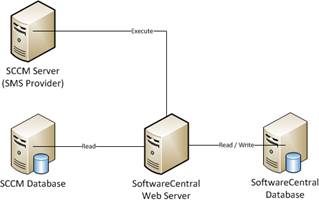
SoftwareCentral communicates with the ConfigMgr server by making WQL commands to the SMS Provider. To retrieve data, SoftwareCentral reads directly from the ConfigMgr database. SoftwareCentral has its own database that contains its settings and metadata.
For multi-site ConfigMgr environments, SoftwareCentral communicates with each primary site server and its database.
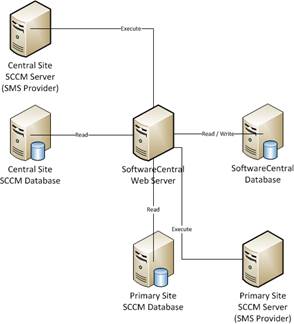
There are many ways to implement a SoftwareCentral installation. It can be installed directly on the ConfigMgr server or on its own dedicated server (recommended).
It is possible to have several SoftwareCentral web servers, all pointing to the same database, to distribute the load.
SoftwareCentral is scalable to any number of clients and users.
11 Best practice
- Install SoftwareCentral on its own dedicated server. It can run on the ConfigMgr server, but a dedicated server is the recommended setup.
- Turn on the Remote Registry Service on the clients where you can. Then tick Remote Registry Service Enabled in Settings › SCCM › Clients. See Requirements for why.
- Give the service account the rights in section 4 on every site and client it manages. Delegating the rights to several accounts is allowed.
- Put packages, applications and task sequences on the central administration site or the primary site. This gives the best result.