1 Errors in the log
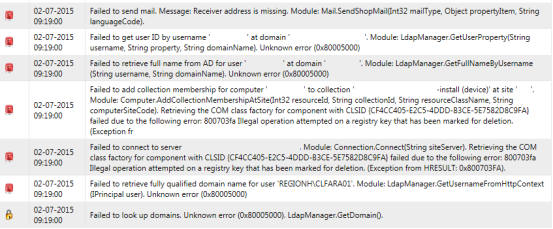
After an update, the Log in SoftwareCentral can fill up with errors such as Unknown error and Illegal operation attempted on a registry key that has been marked for deletion.
2 Step 1: Restart the servers
If it is the first time you experience this problem, restart the servers first.
Restart the server hosting the SoftwareCentral web site and the server where the SMS Provider is located. This can resolve the problem the first time it happens.
When SoftwareCentral writes the registry message to the Log, it adds the sentence This issue can be resolved by restarting the server. so the advice is shown next to the error.
3 Step 2: Turn on the Group Policy setting
If the problem keeps coming back after the restart, enable a Group Policy setting on the server where SoftwareCentral is installed.
Enable Do not forcefully unload the user registry at user logoff from the Local Group Policy Editor on the server where SoftwareCentral is installed.
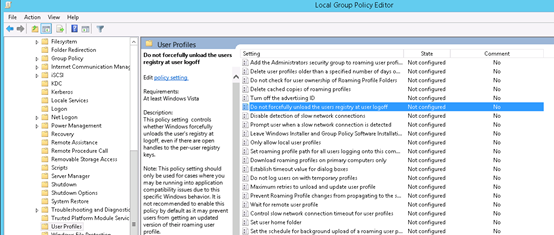
| Where | Path in the Local Group Policy Editor |
|---|---|
| Policy | Computer Configuration › Administrative Templates › System › User Profiles › Do not forcefully unload the user registry at user logoff |
4 Best practice
- Restart first, change the policy second. The restart is the first thing to try. Only enable the Group Policy setting if the errors come back.
- Change the policy on the server, not on every computer. The setting belongs on the server where SoftwareCentral is installed.
- Check the Log after each update. If the registry message appears again, start again with the restart.
- Turn the policy off again when it is not needed. Microsoft advises against leaving it on by default, because it can stop users from getting an updated roaming profile.
5 Troubleshooting
| Symptom | Cause | What to do |
|---|---|---|
| “Illegal operation attempted on a registry key that has been marked for deletion” in the Log | Windows unloaded a user's registry while SoftwareCentral still had it open. The Group Policy setting above controls this Windows behaviour. | Restart the server hosting the SoftwareCentral web site and the SMS Provider server. If it comes back, turn on the policy in step 2. |
| “Unknown error” in the Log | Usually logged together with the registry message above. | Follow steps 1 and 2 above. |
| “This issue can be resolved by restarting the server hosting SoftwareCentral.” on the page that says you have no access | SoftwareCentral found the registry or “Unknown error” message in the last 10 entries of the Log when you tried to sign in, and no role was available to you. | Restart the server hosting SoftwareCentral, then open SoftwareCentral again. |