1 Download the update
You can always get updates of SoftwareCentral from SoftwareCentral Update.
| Where | What you find there |
|---|---|
| softwarecentralupdate.com | The download of the update as a zip file. |
| Release Notes page | All changes made to SoftwareCentral. Read them before you update. |
2 Unblock the zip file
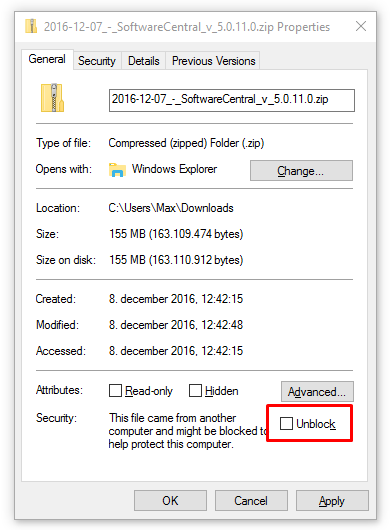
Once you have downloaded the zip file containing the update, you must unblock it before you unzip it.
| Step | What to do |
|---|---|
| 1 | Open the properties of the downloaded zip file. |
| 2 | On the General tab, tick Unblock. |
| 3 | Click OK, then unzip the file. |
When the zip file is unblocked, go on to Installing the update.